Mendinghub | Wedding Listing HTML5 Template Latest Version
Others Themeforest 4.8 (4.7K reviews)
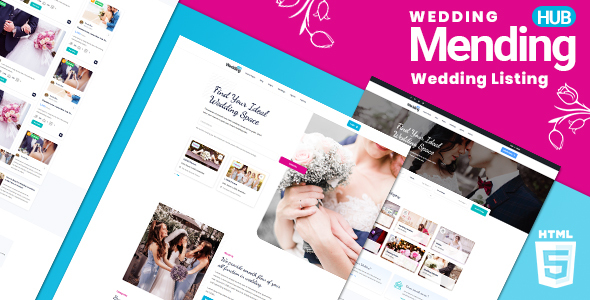
MendingHub is the most feature-rich wedding vendor directory HTML5 template on ThemeForest, delivering 33 fully-designed pages, 3 distinct home layouts, and a front-end 8 colour theme switcher that lets buyers match their brand without touching a single line of code. Built on Bootstrap 5.3.8 with a clean, mobile-first foundation, MendingHub covers every page a real wedding vendor directory needs: from an interactive Leaflet/Mapbox map listing view and a side-by-side listing comparison tool to multi-step listing submission with Dropzone file upload, a full user profile system with saved listings, and a four-layout blog.
In a niche where most competitors offer static map embeds, no colour customisation, and a handful of pages, MendingHub stands apart. The interactive map view (powered by Leaflet with Mapbox GL integration) lets visitors browse vendors spatially—an experience closer to Airbnb than a typical directory template. The listing comparison feature (side-by-side across multiple vendors) is virtually absent from other wedding directory HTML templates. Add the Dancing Script + Roboto font pairing for instant bridal identity and a code base that has been audited for Bootstrap 5 compliance, and MendingHub is the clear premium choice for wedding marketplaces, bridal vendor directories, event venue listings, and wedding planner portals.
Key Features
- 33 HTML pages covering every section of a production-ready wedding vendor directory
- 3 home page layouts (index.html, home-v2.html, home-v3.html)
- 3 listing detail page variants (v1, v2, v3) for maximum flexibility
- Interactive map listing view powered by Leaflet + Mapbox GL (listing-map.html)
- Side-by-side listing comparison tool (compare-listings.html)
- 8 colour themes with a live front-end switcher panel—no coding required
- Bootstrap 5.3.8
- fully upgraded from Bootstrap 4, all data-bs* attributes updated - Dancing Script + Roboto Google Fonts pairing for wedding brand identity
- Agency directory with archive and detail pages
- Agent/vendor profiles with slider carousel
- Multi-step listing submission form with Dropzone.js multi-file image upload
- User profile system with saved listings and managed listings tabs
- Blog in 4 layouts (grid, list, left sidebar, right sidebar) plus a single post template
- Login and Register pages
- Services, Pricing, FAQ, Contact, Legal, Coming Soon, and 404 pages
- Select2-enhanced search dropdowns for category and location filtering
- jQuery Steps multi-step form wizard for guided listing submission
- jQuery Countdown on the Coming Soon page
- Semantic HTML5 markup throughout
- Bootstrap 5 native ARIA attributes on all interactive components
- Fully responsive—tested on mobile, tablet, and desktop viewports
- Well-commented, clearly structured HTML and CSS source code
Interactive Map View (Leaflet + Mapbox)
- Full-page split-view layout: listing cards on the left, live interactive map on the right
- Powered by Leaflet.js with Mapbox GL tile integration for high-quality map rendering
- Custom map markers that match the template’s active colour theme
- Clicking a marker highlights the corresponding listing card and vice versa
- Map view is filterable by category, location, and price range without a page reload
- Fully responsive: map collapses gracefully on mobile viewports
- This level of map integration is rare in any HTML directory template category and absent from all current wedding directory competitors on ThemeForest
- Live preview: listing-map.html
8 Colour Theme System
- 8 complete colour themes, each defined with a single CSS custom property (
--mht-primary) swap - color1.css—Cyan #00B3DD (default)
- color2.css—Red #E53935
- color3.css—Green #2E7D32
- color4.css—Purple #6A1B9A
- color5.css—Orange #E65100
- color6.css—Teal #00695C
- color7.css—Blue #1565C0
- color8.css—Dark Gray #37474F
- Live switcher panel: fixed to the left edge of the screen, triggered by a gear icon, slides in with a 0.4s transition
- Buyers can preview all 8 themes instantly in the browser without editing any file
- No competitor in the wedding vendor directory HTML category on ThemeForest currently offers a colour switcher of this scope
- Switching the active colour stylesheet changes buttons, links, accents, badges, map markers, and form focus states consistently across all 33 pages
3 Unique Home Layouts
- Home 1 (index.html): hero search bar with category icons, featured vendor grid, how-it-works steps, testimonials, and newsletter signup
- Home 2 (home-v2.html): full-width hero with overlay search, horizontal category filter tabs, latest listings carousel, and stats counter section
- Home 3 (home-v3.html): split-screen hero, map preview teaser, top-rated vendors section, and featured blog posts row
- All three home layouts share the same header and footer components, making it trivial to switch between them
- Each layout is independently customisable and demonstrates a different visual hierarchy for different business models (marketplace, local directory, national portal)
3 Listing Detail Layouts
- Listing Detail v1 (listing-details-v1.html): full-width hero image with overlaid title, two-column content and sidebar layout, photo gallery, amenities grid, and reviews section
- Listing Detail v2 (listing-details-v2.html): tabbed navigation for Overview, Gallery, Packages, and Reviews—ideal for vendors with multiple service tiers
- Listing Detail v3 (listing-details-v3.html): horizontal sticky header with quick stats bar, large image mosaic, and inline booking enquiry form
- All three variants include the vendor contact sidebar, rating breakdown, embedded map pin, share buttons, and related listings row
- Buyers can use all three layouts simultaneously for different vendor types (venue vs. florist vs. photographer)
Side-by-Side Listing Comparison
- Dedicated comparison page (compare-listings.html) renders selected vendors in a structured side-by-side table
- Comparison rows cover: price range, category, location, rating, amenities, availability, and contact options
- Highlight rows indicate which vendor wins on each attribute
- Remove-vendor button allows users to swap out listings without leaving the page
- This feature is a significant UX advantage in the wedding planning context, where couples are actively shortlisting multiple vendors
- Rare in the HTML directory template category overall—virtually absent from wedding-niche competitors
Agency Directory System
- Agency archive page (agency-archive.html): paginated grid of agency cards with logo, location, specialisation tags, and total listing count
- Agency detail page (agency-details.html): full agency profile with banner, about section, team member row, all active listings, and contact form
- Useful for marketplace models where wedding planning agencies manage multiple vendor listings under one account
- Agency cards link directly to the agency detail page and display a verified badge state
- Fully responsive card grid adapts from 3 columns on desktop to 1 column on mobile
Agent and Vendor Profiles
- Agent archive page (agent-archive.html): filterable grid of individual vendor/agent cards with avatar, rating, speciality, and listing count
- Agent detail page (agent-details.html): personal profile with bio, social links, active listing slider carousel, and review summary
- The listing slider carousel on the agent detail page uses a responsive carousel integration for smooth horizontal scrolling
- Star rating display and total review count are clearly visible on both the archive card and the detail page
- Social media link row (Facebook, Instagram, Pinterest, LinkedIn) for vendor brand building
- Contact form on the agent detail page includes a subject line and message field for direct enquiries
Submit Listing with File Upload
- Dedicated submit listing page (submit-listing.html) built as a jQuery Steps multi-step form wizard
- Step 1: Basic info (title, category, tags, description)
- Step 2: Location details with map pin placement
- Step 3: Media upload via Dropzone.js—drag-and-drop multi-file image upload with thumbnail preview, file-size validation, and remove button per file
- Step 4: Pricing, amenities checkboxes, and availability hours
- Step 5: Preview and submit confirmation
- Select2-enhanced dropdowns for category and tag selection provide a polished UX
- Progress indicator bar highlights the current step and completed steps
- All fields include inline validation states compatible with Bootstrap 5 validation utilities
User Profile and Saved Listings System
- Profile page (profile.html): editable user account details including name, avatar upload, contact info, and password change form
- Profile listings page (profile-listings.html): table view of all listings the logged-in user has submitted, with edit, pause, and delete action buttons
- Profile saved listings page (profile-saved-listings.html): grid of listings the user has bookmarked/saved for later reference
- Consistent left-sidebar navigation across all three profile pages for easy switching between account sections
- Listing status badges (Active, Pending, Expired) on the managed listings table
- Empty state illustrations for saved listings when no bookmarks exist
Blog System (4 Layouts + Single Post)
- Blog grid layout (blog-grid.html): 3-column card grid with category badge, author, date, and excerpt
- Blog list layout (blog-list.html): horizontal card rows for easier scanning of longer post lists
- Blog left sidebar (blog-left-sidebar.html): two-column layout with sidebar on the left
- Blog right sidebar (blog-right-sidebar.html): two-column layout with sidebar on the right
- Blog single post (blog-single.html): full article view with featured image, author bio card, tags, social share bar, and related posts row
- Sidebar widgets included: Search, Recent Posts, Categories, Popular Tags, and Newsletter signup
- Pagination controls at the bottom of all archive layouts
- Content strategy value: a built-in blog is essential for wedding directory SEO, covering topics like “how to choose a wedding photographer” or “top 10 wedding venues in [city]”
Authentication System (Login + Register)
- Login page (login.html): centered card with email/password fields, “Remember me” checkbox, and “Forgot password” link
- Register page (register.html): full name, email, password, confirm password, and account type selector (Vendor / Couple)
- Both pages include social sign-in button placeholders (Google, Facebook) for easy third-party auth integration
- Clean, focused layouts with minimal distractions to maximise sign-up conversion
- Bootstrap 5 form validation classes applied to all fields
- Links between login and register pages for smooth user flow
Services Page
- Services page (services.html): icon + heading + description card grid showcasing platform features to potential vendors and advertisers
- Six service cards in the default layout: Vendor Listings, Verified Reviews, Interactive Maps, Comparison Tool, Targeted Promotion, and Analytics Dashboard
- Process / how-it-works numbered steps section below the card grid
- CTA banner at the bottom of the page drives visitors toward vendor registration or premium plan upgrade
- Fully editable—each card is a self-contained HTML block with icon class, heading, and paragraph
Pricing System
- Pricing page (pricing.html): three-tier pricing table (Free, Standard, Premium) in side-by-side card layout
- Monthly / Annual toggle switch at the top of the page—switching recalculates displayed prices and highlights annual savings
- Most Popular badge on the recommended middle tier
- Feature comparison checklist per plan with tick / cross indicators
- CTA button per plan links to the register page with pre-selected plan parameter
- FAQ row below the pricing table addresses common billing questions
FAQ System
- FAQ page (faq.html): categorised accordion layout for platform, billing, vendor, and couple-focused question groups
- Bootstrap 5 accordion component with
aria-expandedattributes for full keyboard and screen-reader accessibility - Category tab filter at the top allows users to jump to a relevant question group without scrolling
- Search bar above the accordion for quick filtering of visible questions
- Smooth expand/collapse animation via Bootstrap 5 collapse component
- CTA support link at the bottom directs unanswered questions to the contact page
Contact System
- Contact page (contact-us.html): split layout with contact form on the left and address, phone, email info cards on the right
- Contact form fields: Name, Email, Subject, Message, and a Send button with loading state class
- Embedded map placeholder section below the form for a Google Maps or Leaflet iframe integration
- Three info cards with Font Awesome icons for Location, Phone, and Email
- Social media links row in the contact section footer
- Bootstrap 5 form validation applied to all required fields
Utility Pages (Legal, Coming Soon, 404)
- Legal page (legal.html): two-column layout with sticky anchor navigation on the left and Terms of Service / Privacy Policy content on the right—jump links scroll to each section smoothly
- Coming Soon page (coming-soon.html): full-screen hero with overlay, brand logo, launch date countdown timer (powered by jQuery Countdown), and email notification signup field
- 404 page (404.html): centered illustration, friendly error message, and a prominent “Go Home” CTA button to minimise bounce
- All utility pages include the standard header and footer for consistent branding
- Coming Soon page is designed to stand alone without the main navigation, making it ready to deploy during a site launch holding period
Navigation and UX
- Sticky top navigation bar with transparent-to-solid scroll transition on all home layouts
- Mega menu support for category browsing without navigating to a separate page
- Mobile hamburger menu with Bootstrap 5 offcanvas or collapse—fully touch-friendly
- Breadcrumb trail on all inner pages for clear wayfinding
- Back-to-top button appears after scrolling 300px and smoothly scrolls to the top
- Colour switcher panel: fixed to the left screen edge, triggered by a gear icon, slides open with a 0.4s CSS transition
- All dropdowns use Bootstrap 5
aria-haspopupandaria-expandedattributes - Focus-visible outlines preserved throughout for keyboard navigation
- Consistent footer across all 33 pages: logo, tagline, navigation columns, social icons, and copyright bar
Typography and Design
- Primary font: Roboto (Google Fonts)—clean, legible, professional for body copy, labels, and UI text
- Accent font: Dancing Script (Google Fonts)—elegant cursive used for hero taglines, section headings, and decorative pull quotes to establish immediate wedding brand identity
- The Dancing Script + Roboto pairing is a deliberate brand decision: competitors in the wedding directory HTML category uniformly use generic sans-serif fonts with no calligraphic accent, making MendingHub visually distinct at first glance
- Default primary colour: Cyan #00B3DD—bright, modern, and gender-neutral, contrasting cleanly on both white and dark-card backgrounds
- Whitespace-generous card design with subtle box shadows and rounded corners throughout
- Consistent icon language using Font Awesome 6 Free across all pages
- Photography placeholders sized and cropped to reflect realistic vendor imagery ratios
- Form elements use Bootstrap 5 default styling extended with the active colour theme for focus rings and checked state accents
Cross-Browser and Device Compatibility
- Tested and verified on Chrome, Firefox, Safari, and Microsoft Edge (latest versions)
- Fully responsive across mobile (320px+), tablet (768px+), and desktop (1200px+) breakpoints
- Bootstrap 5.3.8 grid system used throughout—no custom grid hacks
- All interactive components (accordion, collapse, modal, offcanvas) rely on Bootstrap 5’s built-in JS—no conflicting plugins
- Leaflet and Mapbox map container resizes correctly on viewport change and orientation switch
- Dropzone file upload degrades gracefully on browsers without drag-and-drop support, falling back to a standard file input
- Images use
img-fluidand appropriateobject-fitCSS for correct aspect ratio on all screen sizes - Touch events handled natively by Bootstrap 5 carousel and offcanvas components
Pages Included
- index.html—Home 1
- home-v2.html—Home 2
- home-v3.html—Home 3
- listing-grid.html—Listing Grid View
- listing-list.html—Listing List View
- listing-map.html—Listing Map View (Leaflet + Mapbox)
- listing-details-v1.html—Listing Detail v1
- listing-details-v2.html—Listing Detail v2
- listing-details-v3.html—Listing Detail v3
- compare-listings.html—Compare Listings
- agency-archive.html—Agency Archive
- agency-details.html—Agency Detail
- agent-archive.html—Agent Archive
- agent-details.html—Agent Detail
- submit-listing.html—Submit Listing
- profile.html—User Profile
- profile-listings.html—Profile: My Listings
- profile-saved-listings.html—Profile: Saved Listings
- blog-grid.html—Blog Grid
- blog-list.html—Blog List
- blog-left-sidebar.html—Blog Left Sidebar
- blog-right-sidebar.html—Blog Right Sidebar
- blog-single.html—Blog Single Post
- services.html—Services
- pricing.html—Pricing
- faq.html—FAQ
- contact-us.html—Contact Us
- login.html—Login
- register.html—Register
- legal.html—Legal / Terms
- coming-soon.html—Coming Soon
- 404.html—404 Not Found
Credits and Sources
- Bootstrap 5.3.8
- https://getbootstrap.com -MIT License - jQuery 3.x
- https://jquery.com -MIT License - Leaflet.js
- https://leafletjs.com -BSD 2-Clause License - Mapbox GL JS
- https://mapbox.com -Mapbox Terms of Service (free tier) - Dropzone.js
- https://dropzone.dev -MIT License - Select2
- https://select2.org -MIT License - jQuery Steps
- https://github.com/rstaib/jquery-steps -MIT License - jQuery Countdown
- https://hilios.github.io/jQuery.countdown -MIT License - Font Awesome 6 Free
- https://fontawesome.com -SIL OFL 1.1 (icons), MIT (CSS) - Google Fonts: Roboto
- https://fonts.google.com/specimen/Roboto -Apache License 2.0 - Google Fonts: Dancing Script
- https://fonts.google.com/specimen/Dancing+Script -OFL - Demo images: Unsplash
- https://unsplash.com -Unsplash License (free for commercial use) - Demo images: Pexels
- https://pexels.com -Pexels License (free for commercial use)
v1.1  27/02/2026
- Upgraded Bootstrap from 4.3.1 to 5.3.8
- Upgraded Popper from 1.x to @popperjs/core 2.11.8
- Updated all data-* attributes to data-bs-* format
- Migrated Bootstrap 4 utility classes to Bootstrap 5 equivalents
- Added bootstrap-compat.css shim for smooth upgrade path
- Added 8-colour theme switcher (color1.css through color8.css, CSS custom property --mht-primary)
- Added mht-switcher panel: fixed left, gear icon trigger, 0.4s slide transition
More from this category
 Themeforest

- Item type
- template
- Category
- Others
- Version
- Latest Version
- Availability
- In stock
- Delivery
- Digital
- Last updated
- October 2, 2026
The available listing for Mendinghub | Wedding Listing HTML5 Template places it among Others products. It is presented here as a template with its supplied description and purchase information.
Usage rights depend on the license selected at checkout. Review the complete terms before using this item for client work, redistribution, SaaS, or more than one end product.